The Java Logging API
By Brian Gilstrap, OCI Principal Software Engineer
June 2001
The first beta release of JDK 1.4 came out just a few weeks ago, and included with it is a new logging API.
This API was first described in JSR 47. Essentially the same description is also available in the documentation of logging for the beta of JDK 1.4.
In addition to the implementation provided in JDK 1.4, there is an open source implementation of the API for JDKs 1.2 and 1.3 called Lumberjack available on SourceForge. The library provides a way for people to begin using the API before JDK 1.4 becomes final. It will also allow them to use the API in work they do in the future, which must be done in 1.2 or 1.3 for some reason.
What is the Logging API?
The logging API will be a part of the core platform in JDK 1.4, which means it will ship with the JDK. It is designed to let a Java program, servlet, applet, EJB, etc. produce messages of interest to end users, system administrators, field engineers, and software developers.
Especially in production situations, where things can't be run in a debugger, or doing so masks the problem that is occurring (because it is timing related, for example), such logs are frequently the greatest source (and sometimes the only source) of information about a running program.
To make sure that logging can be left in a production program, the API is designed to make logging as inexpensive as possible. To allow for code that can produce fine grained logging, but not slow the application in normal production use, the API allows for the dynamic tuning of what log messages are produced, so that the impact of the logging code is minimized during normal operation.
It also provides a number of Java interfaces and superclasses that provide "hooks" for developers to extend the API in a standard manner.
The entire logging API is contained in the package java.util.logging and is made up of the following interfaces and classes:
ConsoleHandlerFileHanderFilterFormatterHandlerLevelLoggerLoggingPermissionLogManagerLogRecordMemoryHandlerSimpleFormatterSocketHandlerStreamHandlerXMLFormatter
We'll examine many of these classes and interfaces in more detail below.
An Example
To help motivate the use of the logging API, we will use a simple program, based on the idea of the "Hello world" programs used to teach programming.
- package com.ociweb.jnbjune2001.example1;
- /**
- * A simple Java Hello World program, in the tradition of
- * Kernighan and Ritchie.
- */
- public class HelloWorld {
- public static void main(String[] args) {
- HelloWorld hello = new HelloWorld("Hello world!");
- hello.sayHello();
- }
-
- private String theMessage;
-
- public HelloWorld(String message) {
- theMessage = message;
- }
-
- public void sayHello() {
- System.err.println(theMessage);
- }
- }
We will expand upon this simple program in order to demonstrate the logging API.
The first thing we will do is actually generate a logging message. This is straightforward. We need to create a Logger object, which represents the HelloWorld class, like this:
- package com.ociweb.jnbjune2001.example2;
- import java.util.logging.Logger;
- /**
- * A simple Java Hello World program, in the tradition of
- * Kernighan and Ritchie.
- */
- public class HelloWorld {
- private static Logger theLogger =
- Logger.getLogger(HelloWorld.class.getName());
-
- public static void main(String[] args) {
- HelloWorld hello = new HelloWorld("Hello world!");
- hello.sayHello();
- }
-
- private String theMessage;
-
- public HelloWorld(String message) {
- theMessage = message;
- }
-
- public void sayHello() {
- System.err.println(theMessage);
- }
- }
This generates a Logger, which we can use to generate logging messages.
Since you typically use one logger per class, we can make it a static field of the HelloWorld class. We use the fully qualified name of the HelloWorld class as the name of the Logger.
We'll look at the reasons for this in more detail later. Now let's actually use the Logger and try to generate a logging message:
- package com.ociweb.jnbjune2001.example3;
- import java.util.logging.Logger;
- /**
- * A simple Java Hello World program, in the tradition of
- * Kernighan and Ritchie.
- */
- public class HelloWorld {
- private static Logger theLogger =
- Logger.getLogger(HelloWorld.class.getName());
-
- public static void main(String[] args) {
- HelloWorld hello = new HelloWorld("Hello world!");
- hello.sayHello();
- }
-
- private String theMessage;
-
- public HelloWorld(String message) {
- theMessage = message;
- }
-
- public void sayHello() {
- // use the 'least important' type of message, one at
- // the 'finest' level.
- theLogger.finest("Hello logging!");
- System.err.println(theMessage);
- }
- }
The logging API has a configuration file, and by default it provides a handler which will send logging messages, in the form of a LogRecord to the 'console' (System.err). So we would expect to see the string "Hello logging!" appear before our message of "Hello world!". But if you run this program, you only see "Hello world!":
java com.ociweb.jnbjune2001.example3.HelloWorld
Hello world
What's going on here?
The answer lies in the notion of logging levels.
Logging Levels
Because we want to leave logging code in an application that goes into production, we need logging to cost us very little at runtime when it is not being used.
To help achieve this, the logging system defines a class called Level to specify the importance of a logging record.
The logging library has a set of predefined logging levels, as follows:
SEVERE |
the highest value |
WARNING |
|
INFO |
|
CONFIG |
|
FINE |
|
FINER |
|
FINEST |
the lowest value |
In addition to these levels, there is a level, ALL, which enables logging of all records and one called OFF that can be used to turn off logging.
It is also possible to define custom levels, but in this article we will stick with the predefined levels.
So, now we can explain why our logging records didn't appear. We used the finest() method of our logger, which generates a logging record at the Level.FINEST level. By default, only records that are at the Level.INFO level or higher will be logged to the console.
So we can cause our logging record to appear by increasing the level of logging, like this:
- package com.ociweb.jnbjune2001.example4;
- import java.util.logging.Logger;
- /**
- * A simple Java Hello World program, in the tradition of
- * Kernighan and Ritchie.
- */
- public class HelloWorld {
- private static Logger theLogger =
- Logger.getLogger(HelloWorld.class.getName());
-
- public static void main(String[] args) {
- HelloWorld hello = new HelloWorld("Hello world!");
- hello.sayHello();
- }
-
- private String theMessage;
-
- public HelloWorld(String message) {
- theMessage = message;
- }
-
- public void sayHello() {
- theLogger.info("Hello logging!");
- System.err.println(theMessage);
- }
- }
Now, when we run this program we see output like this:
java com.ociweb.jnbjune2001.example3.HelloWorld
INFO; 992149105222ms; 3207485;# 1; null; null; Hello logging!
Hello world!
Of course, using a higher logging level for a logging record is not always what we want. Sometimes we have messages that are finer-grained than the INFO level, and we only want them printed when the information they contain is needed. To allow this, the logging library allows us to control the log level of our Loggers.
Logger Levels and Handlers
When we created our Logger, we specified the name of our class (com.ociweb.jnbjune2001.example4.HelloWorld) as the Logger name but didn't specify anything else. When a Logger is created, it is set to screen out any record that doesn't have a level as high as the one the Logger is set to have.
By default, the threshold is set to Level.INFO. This means that records we log through our Logger will only get printed if they are at least has high as Level.INFO.
To get finer-grained records to be logged, we need to set the logging level for our class to something more verbose. But that isn't quite enough, because when a record is logged to a Logger, that Logger actually delegates the output of the record to a subclass of the Handler class, like this:

So, even if we turn up the log level of our Logger, when the logger hands the record to the global handlers (which it does by default), the handlers ignore a Level.FINE record.
To get the global handlers to actually output the record, we need to turn up their levels, like this:
- package com.ociweb.jnbjune2001.example5;
- import java.util.logging.Handler;
- import java.util.logging.Level;
- import java.util.logging.Logger;
- import java.util.logging.LogManager;
- /**
- * A simple Java Hello World program, in the tradition of
- * Kernighan and Ritchie.
- */
- public class HelloWorld {
- private static Logger theLogger =
- Logger.getLogger(HelloWorld.class.getName());
-
- public static void main( String[] args ) {
- // The global handlers default to INFO, we have to
- // crank them up. We could crank up only some of them
- // if we wanted, but we will turn them all up.
- Handler[] handlers =
- LogManager.getLogManager().getGlobalHandlers();
- for (int index = 0; index < handlers.length; index++) {
- handlers[index].setLevel(Level.FINE);
- }
- // We also have to set our logger to log finer-grained
- // messages
- theLogger.setLevel(Level.FINE);
- HelloWorld hello =
- new HelloWorld("Hello world!");
- hello.sayHello();
- }
-
- private String theMessage;
-
- public HelloWorld(String message) {
- theMessage = message;
- }
-
- public void sayHello() {
- theLogger.fine("Hello logging!");
- System.err.println(theMessage);
- }
- }
This will produce output on the console like this:
FINE; 992190676635ms; 5213611;# 1; null; null; Hello logging!
Hello world!
(For more details on the meaning of everything in this message, see the discussion of logging in the JDK 1.4 documentation)
In addition, there is another default global handler, which is an instance of the FileHandler class. It logs its records to a location specified by a property. Instead of the simple text format produced by SimpleFormatter (seen above), it uses an XML format for its records.
The program above produces output like this:
<?xml version="1.0" encoding="UTF-8" standalone="no"?>
<!DOCTYPE log SYSTEM "logger.dtd">
<log>
     <record>
         <date>2001-06-10T05:31:16</date>
         <millis>992190676635</millis>
         <sequence>1</sequence>
         <logger>com.ociweb.jnbjune2001.example5.HelloWorld</logger>
         <level>FINE</level>
         <thread>5213611</thread>
         <message>Hello logging!</message>
     </record>
</log>
There is much more that can be done with handlers, and it is even possible to create your own custom handlers. Space won't allow us to discuss them in more detail here (see the references below for places to learn more about handlers).
The LogManager
The LogManager is in many ways the central class of the logging library. It provides much of the control over what gets logged and where it gets logged, including control over initialization of logging.
In terms of logging levels, the LogManager allows us to set different logging levels for different "areas" of the program. To understand this, we need to think of our program as being broken down into different areas based on the package prefix of the classes involved.
So our program areas are organized in a tree structure, like this (only some of the tree is shown to simplify the discussion):
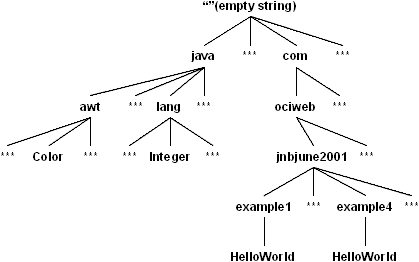
But the LogManager will allow us to control things at more than just the class level. We could set the logging level for a package, or even a set of packages, by calling the LogManager.setLevel(String name, Level level) method.
So, for example, we could set the logging level of all loggers for this article to Level.FINE by making this call:
LogManager.getLogManager().setLevel("com.ociweb.jnbjune2001", Level.FINE);This would make all classes with the package prefix of "com.ociweb.jnbjune2001" have a level ofLevel.FINE:
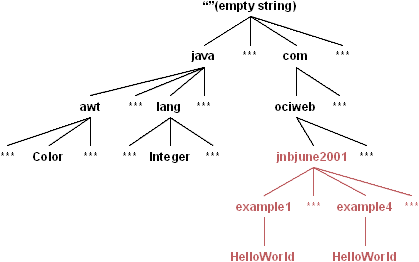
We would still need to turn up the levels of the global handlers as before, but we would not have to set the individual loggers one at a time.
In addition to providing this ability to control log levels "en masse", the LogManager provides:
- The means to manage and alter a set of global handlers (as described above)
- The ability to create new named
Loggers (seen above) - The ability to create anonymous
Loggers (useful to applets running in a more constrained security environment) - Get/Set the log
Levelof a given package prefix or class
A Word about Filters
While space won't permit us to go into a description of Filters, the logging API provides them as a means to further control what records get logged. So, if you are using logging and find that you want use more than the log Level of a record when deciding whether to log it, Filters are available. They can be attached to both Loggers and Handlers, and can be thought of like this:
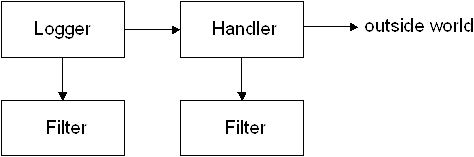
In this situation, the record must pass the Logger's level check, the Logger's Filter, the Handler's level check and the Handler's Filter before it's actually sent to the outside world. This allows things to start out simple (with no filters) and become more sophisticated as needed.
In situations where you're trying to get at just the right information without altering the behavior of the program too much (and without overwhelming someone reading the output), the ability to create more sophisticated filters can be key to learning what needs to be known.
A Word about Logger Names
This article demonstrates using the fully qualified class name of your class as the name of your Logger. This is also the approach recommended by the Logging API documentation.
However, the LogManager and Loggers really only care that the names used are made up of strings separated by period characters. So if you need to organize the logging of your software in some other manner, you can do so, as long as your scheme fits into a tree hierarchy.
In addition, it is possible to use anonymous loggers, which don't have a name and which don't tie into the global Handlers. These are good for applets running in a browser, as well as other high-security situations. They can also be used to keep classes relatively self-contained. However, when using anonymous loggers, you don't get many of the benefits of a named logger (the ability to have records forwarded to the global handlers, the ability to alter logging levels of groups of loggers by their common prefix, etc.).
Summary
The logging API seems to strike a good balance between simplicity and power. As the examples above show, it is possible to get started with logging very quickly. Yet it is designed to be extensible, so that it can be tailored to your needs.
This article has really just scratched the surface of what can be done with logging. In particular, topics that we didn't discuss that the API allows for include:
- Use of
Filters - Custom
Filters - The
SocketHandler - Writing your own
Handlers - Altering the configuration of logging via custom config files
- Internationalization
- J2EE integration
For more information about logging, the best sources of information are the JDK 1.4 documentation on logging and JSR 47. There is also Javadoc for the java.util.logging package, which provides details about the classes.
References
- [1] The JDK 1.4 documentation on Logging
http://java.sun.com/j2se/1.4/docs/guide/util/logging/index.html - [2] The JDK 1.4 Javadoc for Logging
http://java.sun.com/j2se/1.4/docs/api/java/util/logging/package-summary.html - [3] JSR 47
http://jcp.org/jsr/detail/47.jsp - [4] The Lumberjack project (the Logging API for JDKs 1.2 & 1.3; open source)
http://javalogging.sourceforge.net
Software Engineering Tech Trends (SETT) is a regular publication featuring emerging trends in software engineering.
